More than a topic and a slide deck
Connect curriculum goals, learning intentions and success criteria with a sequence that builds understanding and application.
Thoughtful education software that helps teachers turn their expertise into structured, engaging lessons. Built around what matters most: students’ learning.
Independent education software. Discover why it was created ↗
Actual Studio output supplied by the founder · Science example
A lesson template can set expectations. Teachers still have to turn those expectations into learning that works for the students in front of them.
The Studio was created to make those decisions clearer: what students need to learn, what they already understand, which teaching approach fits, and where support or greater challenge is needed.
It aims to give teachers a more reliable planning foundation, reduce avoidable omissions and make drafting and formatting more manageable. Its value will be judged through the learning students experience.
Connect curriculum goals, learning intentions and success criteria with a sequence that builds understanding and application.
Bring starting points, language needs and participation into the planning process, so adaptations have a clear learning purpose.
Give teachers practical choices while retaining their responsibility for subject accuracy, suitability and decisions during the lesson.
The pilot will test the connection between teacher benefits and student learning. These are intended outcomes, not results already established.
| For teachers | For students | What the pilot will check |
|---|---|---|
| Less avoidable drafting and formatting | More teacher attention available for feedback and individual needs, if saved time is used in that way. | Total preparation time, including checking and editing, alongside observed feedback and access to support. |
| More coherent and consistent planning | Clearer explanations, understandable goals and a sequence that helps learning build. | Reviewed lesson plans, calibrated observations, student work and students’ views on clarity. |
| More informed choices about teaching | Suitable challenge, accessible tasks and purposeful participation. | Teacher reflections, HoD learning walks and evidence of participation, reasoning and challenge. |
| Stronger assessment decisions | Misconceptions receive a teaching response, with more opportunities for independent application. | Understanding checks, responses to assessment, comparable tasks and a delayed check where feasible. |
Reduced workload matters in its own right. Student benefit also requires effective classroom use, so the pilot will evaluate workload, teaching quality and student learning separately.
A guided planning experience for Years 7–9 that connects learning goals, teaching models, class needs and activity choices with editable teaching materials.
Search for a lesson, describe your class, select a teaching model and adapt the activities. Review the learning intention and success criteria, then prepare resources for your class.
Launch priority: English, Mathematics and Science. The gallery also includes a History output example. Final release coverage and exports remain subject to testing.
Explain evaporation using a particle model.
Predict what happens to a puddle on a warm day.
Compare observations of water drying in different conditions.
Connect observations to particles escaping from the surface.
Use the model to explain why wet clothes dry faster in warmth.
Explain why evaporation can happen below boiling point.
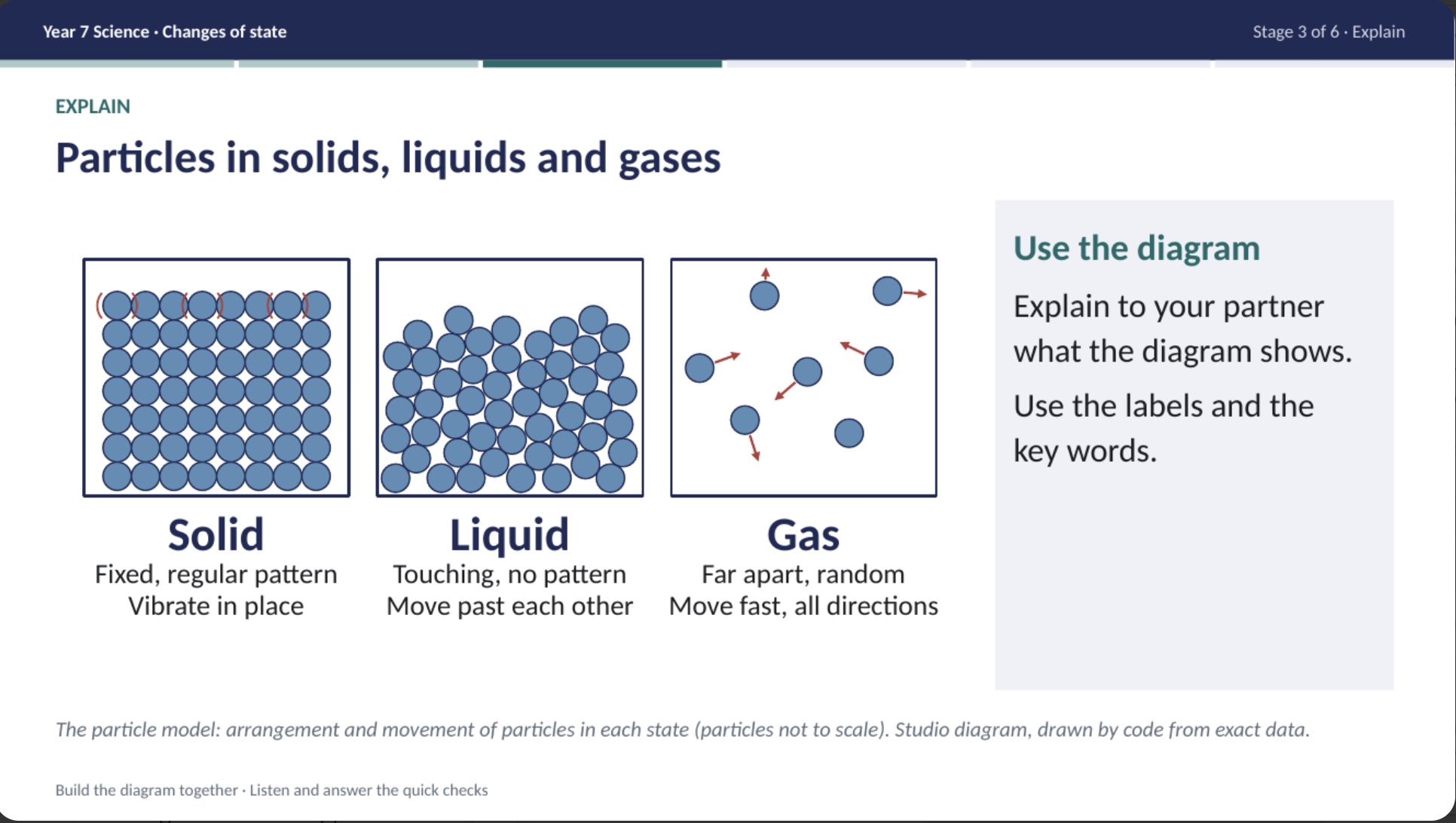
Use a labelled particle diagram, a key-word bank and an explanation sentence starter.
These examples explain the planning approach. This is not the Studio application or a lesson generator. Teachers review content, adapt tasks and check suitability before classroom use.
Real screenshots from the platform and its lesson outputs. Explore how planning decisions connect to what students see and do.
A clear starting point for planning.
Search for a lesson or work through subject, year group, unit and lesson. Set the lesson length before moving on.
For students: a lesson built around a specific learning focus.
For teachers: a guided route from curriculum choice to lesson preparation.
Screenshots show the supplied development version. Examples demonstrate the planning experience and resource formats; final subject coverage remains subject to release testing.
The Studio brings key planning decisions into one process, from choosing the learning to reviewing the materials for classroom use.
Search or select a subject, year, unit and lesson. Set the lesson length and describe the class’s attainment and participation needs.
Choose an appropriate teaching model. Review the learning intention and success criteria against the curriculum and students’ starting points.
Choose and refine activities, adjust timings and review vocabulary and visual support. Add Supported, Guided or Challenge options and plan checks for understanding.
Export editable PowerPoint slides, a lesson plan, student resources and teacher answers, individually or together in a ZIP. Check content, examples and timing before teaching.
Editable PowerPoint slides, a Word lesson plan with class context and adaptive teaching, student resources and teacher answers. Export individual files or a complete ZIP, and save the lesson file.
Proofread every output, check accuracy and curriculum alignment, adapt it to your students and respond to their understanding during the lesson.
The downloadable offline version remains in development. The gallery shows supplied platform screens and examples of outputs; final release coverage and exports remain subject to testing.
KS3 Lesson Studio comes first. Further products are planned and are not currently available to purchase.
Specification-led lesson preparation for GCSE, International GCSE, AS and A Level teaching.
PlannedConnect observations, learning walks and book scrutiny with support, follow-up and evidence of impact.
PlannedTurn priorities into clear actions, named responsibilities and measurable milestones.
PlannedPragmatic Middle Leadership, Pragmatic Performance Intelligence, Pragmatic Self-Evaluation and Pragmatic Inspection Readiness are also being considered. The aim is a family of focused, offline tools that help educators organise their work and act on evidence. Release dates, features and pricing have not been announced.
Pragmatic Education is an independent project founded by Seán Doherty, a secondary school leader with experience across teaching, curriculum, assessment and school improvement.
The starting point is simple: education software should make demanding work more manageable while keeping professional judgement and student learning at its heart.
Our products are shaped by everyday classroom needs: coherent lessons, meaningful challenge, accessible explanations and evidence that helps teachers decide what to do next.
Pragmatic KS3 Lesson Studio is in development. The initial focus is English, Mathematics and Science, with coverage and exports being checked before release. Contact Seán to discuss the product or a possible school trial. No public checkout or download is currently available on this website.
The offline version is being developed to run without a live AI connection. Lessons and resources are prepared within the product’s available content and planning options. This website introduces the product; it does not provide the downloadable application.
The supplied platform screenshots show explicit instruction, I Do, We Do, You Do, problem-based learning and enquiry-based learning. The lesson outputs also show the 5Es. Teachers choose the model that suits the content and the class. The interactive lesson sequence on this website is an illustration of the approach.
The platform includes class profiles for Sets 1–4 and mixed attainment, participation structures, and Supported, Guided and Challenge activity adaptations. The screenshots show concrete representations, chunked instructions, guided practice and greater-depth reasoning. Teachers review and choose the adaptations that suit their learners.
The proposed model is a six-week pilot in a core department in each of two schools. It includes baselines, an in-depth workshop, weekly HoD support and a final review of teaching, student outcomes, student voice and teacher workload. School participation and arrangements are agreed before starting. The findings determine whether to continue, adapt or stop.
Pragmatic Education is an independent project. This website does not represent a school, school group, inspection body or awarding organisation.
For your teaching, your department or your school. Talk to Seán about Pragmatic KS3 Lesson Studio, the launch or a six-week pilot that evaluates both teacher experience and student learning.
Connect with Seán on LinkedInOpens LinkedIn in a new tab. Send your enquiry there.